Capture events as they happen
Log incidents, exchanges, communication issues, school concerns, medical notes, and other relevant events while details are still fresh.
The CustodyCourtReady Evidence Builder helps you capture events as they happen, link evidence to your court order, analyze co-parenting response times from bulk message exports or emails, draft proposed order language, and print an organized preparation document — all in one workspace.

Log incidents, exchanges, communication issues, school concerns, medical notes, and other relevant events while details are still fresh.
Paste sections of your order and link evidence entries to each one, tagged as followed, violated, or neutral — so compliance patterns are visible at a glance.
Upload a bulk message report from other apps or exported emails and get response-time statistics for each parent, ready to save as evidence.
Generate proposed order language from your documented evidence, check it for enforceability gaps, and arrange it into a clean printable document.
Document once and build from there instead of digging through months of screenshots and messages later.
Pattern detection flags recent violation clusters and rising frequency, and a timeline makes repeated issues easier to recognize than scattered notes.
Communication analysis turns "they never respond" into measurable statistics — averages, medians, fastest and slowest response times per parent.
Drafting tools check for vague terms, missing deadlines, and absent consequences — the gaps that make provisions unenforceable.
Steady documentation over time plus a ready-to-print preparation document beats reconstructing everything at the last minute.
You decide what to enter, what to keep, and how to use it as part of your documentation process.
Keep notes, uploads, court documents, and a timeline together so the important parts of your case are easier to review in context.
A stronger record helps you prepare talking points, gather documents faster, and communicate your timeline more clearly.
Custody documentation often develops over months. The Evidence Builder supports that kind of ongoing recordkeeping — for modifications, contempt, temporary or permanent custody, and DVPO cases.
When the current order isn't working, your linked evidence feeds directly into drafting proposed replacement language — with guidance built in.
Pick a case type — custody modification, temporary, permanent, DVPO, contempt, or general — upload existing court documents, and start logging entries.
Add entries with guided fields, attach screenshots and records, and link each entry to the court order section it relates to.
Run communication analysis on bulk message exports or emails, review compliance patterns, and draft proposed order language backed by your evidence.
Arrange your saved drafts in order, then print a clean, organized preparation document with your case details and exhibit citations.
Separate matters by case type, with court documents uploaded right at case creation.
Capture the important details with structured fields instead of loose notes.
See incidents in a cleaner chronological format so patterns stand out faster.
Measure response times from bulk message exports or exported emails.
Link evidence to court order sections and tag it followed, violated, or neutral.
Turn documented patterns into specific, enforceable proposed order language.
Arrange saved drafts and print one clean, organized, court-friendly document.
Download logs and print records when you need to review, save, or share them.
Start by setting up a case workspace. Choose the case type that fits your situation — with plain-language descriptions if you're not sure — and upload existing court documents so everything lives with the case from day one.
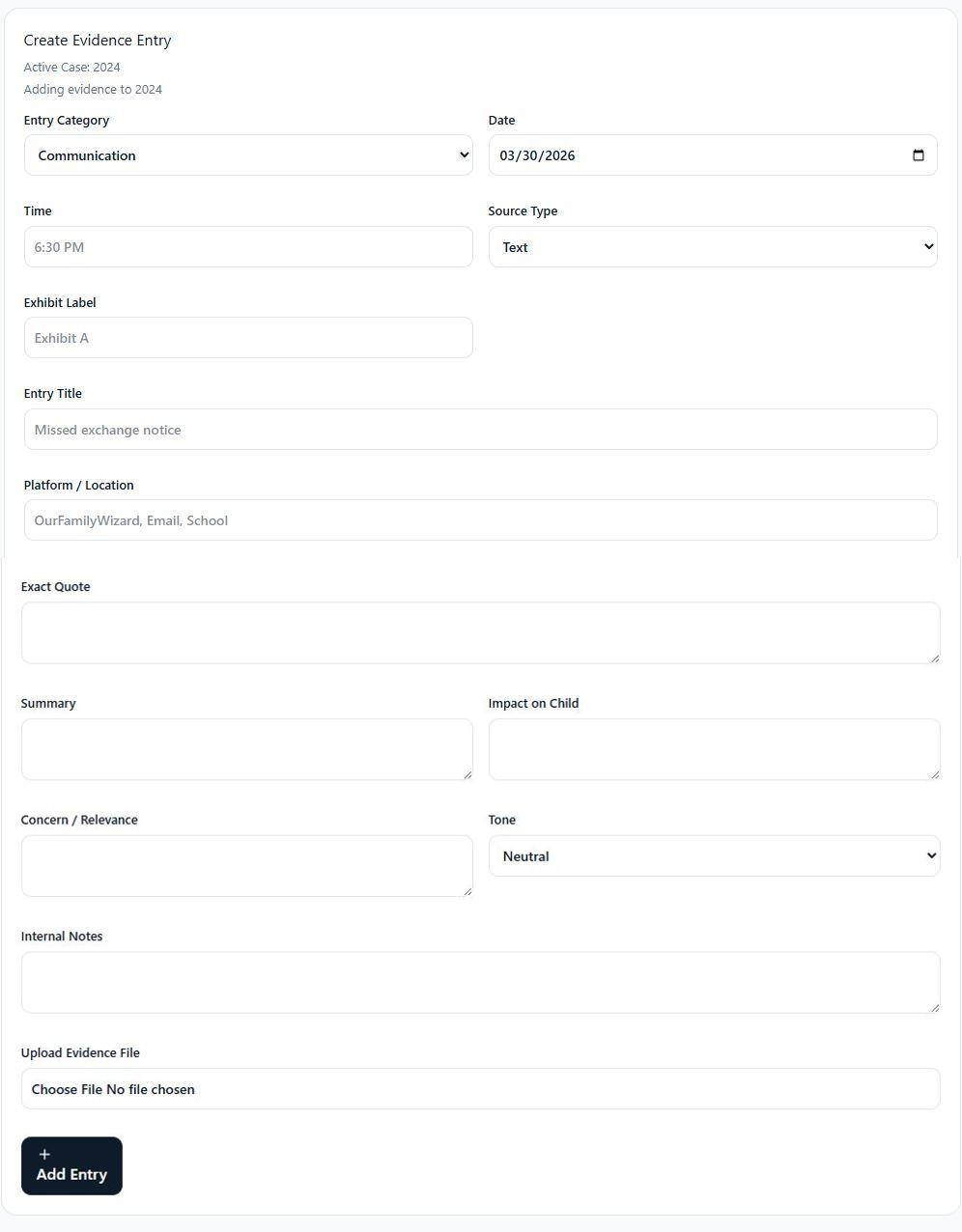
The evidence entry form is structured to help users capture the facts clearly. Instead of relying on memory later, the app prompts for the kind of details that make an entry more useful.
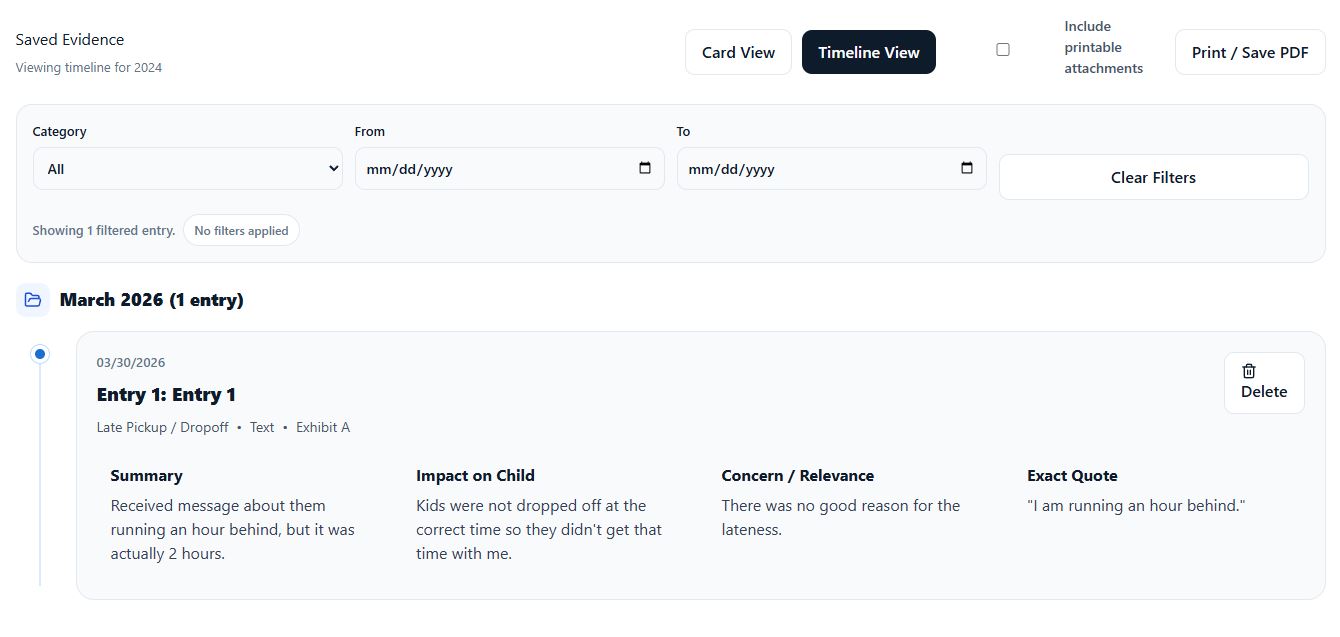
Timeline view helps turn separate entries into a chronological story. Filters and grouped dates make it easier to focus on a date range, category, or sequence of events.
Upload a bulk message report PDF exported from other co-parenting apps, or exported email files (.eml), and the Communication Analysis tool measures how quickly each parent responds — turning a vague complaint into measurable, documented statistics you can save as evidence.
Paste the sections of your court order into Order Sections, then link evidence entries to each one — tagged as followed, violated, or neutral. Every section shows its compliance status at a glance, and pattern detection highlights recent clusters and rising frequency.
Describe what you want the new order section to address in your own words. The draft tool pairs your request with your linked evidence — then a built-in toolkit helps you strengthen it: an enforceability check, tone review, clause library, remedy suggestions, an evidence-cited rationale, and a redline compare against the current order.
Saved drafts collect in one place, ready to reuse and refine. Add the ones you want to your preparation document, arrange them in the order they should appear, and print a clean, organized document with your case details, numbered proposed sections, and an attorney-review disclaimer.
The workspace area keeps practical actions within reach. Users can export logs, download CSVs, manage billing, and stay in control of their account from one clean panel.
Communication Analysis measures co-parenting response times from two source types: a bulk message report PDF exported from other apps, or exported email files (.eml) from your email app. It matches messages into conversation threads and calculates the average, median, fastest, and slowest response time for each parent.
Any analysis can be saved to your case and added as an evidence entry.
Yes. The Draft Language tool summarizes the evidence linked to a court order section, offers starter ideas based on your documented patterns, and generates a draft from your own description of what you want changed. Built-in checks flag vague terms, missing deadlines, absent consequences, and inflammatory tone, and a clause library and remedy suggestions help you fill gaps.
These are drafting aids, not legal advice — always review proposed language with a licensed attorney before submitting anything to the court.
The Preparation Document collects the proposed language drafts you choose, in the order you arrange them, and prints them as one clean, organized document — with your case details, numbered sections, and an attorney-review disclaimer. You can print to paper or save it as a PDF.
You can cancel your subscription at any time from your account settings. Go to Manage Billing or your subscription area and follow the cancellation steps.
After canceling, your subscription stays active until the end of your current billing period.
No. Cancellation does not immediately remove your saved records. Your information is typically retained for a period after your subscription ends.
Your data is securely stored for typically up to 1 year after your subscription ends.
You may request permanent deletion of your data at any time by emailing support@custodycourtready.com. Once permanently deleted, the data cannot be recovered.
We take privacy and account security seriously. Your records are stored in your account workspace behind authentication, with access restricted to your account — so you can manage everything in one place instead of leaving it scattered across devices and folders.
Your subscription renews automatically based on the plan you selected. If you cancel, you will continue to have access through the end of your current billing period.
Refunds are not typically offered once a subscription has started. If there is a billing error or technical issue, contact support@custodycourtready.com and we will review the issue.
Yes. Subscribers can print their records as often as needed in any available format — including the evidence timeline and the organized Preparation Document.
No. As part of your subscription, you can print and export as much as you want in any available format.
We never charge additional fees for subscribers for printing or exporting their records.
Parents often document communication issues, missed exchanges, schedule changes, school concerns, incidents, and other records relevant to the child’s well-being. Clear, factual, consistent entries are usually the most useful — and linking them to the relevant court order section makes patterns easier to demonstrate later.
Email support@custodycourtready.com for help with billing, account access, or data requests.